Optimized Data Transfer for Better Business Performance

Free Download
We Helped a Global B2B Platform Achieve a 90% Efficiency Gain by Integrating CRM Data with Snowflake
Executive summary
  • Client: Global B2B payments platform, 1M+ customers in 100+ countries
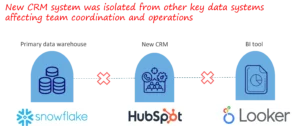
  • Challenge Faced by Client:The company recently adopted a new CRM. However, there was no existing ETL or data sync process between the CRM and the Snowflake data warehouse. Both systems held different versions of customer records, updates were delayed, and teams had to manually export and fix data. This led to inconsistent reporting, operational delays, and a lack of trust in customer information.
  • Technical Approach: We built an ETL pipeline, using a cloud-based integration tool and a structured implementation approach involving five steps:
  1. Designed the ETL architecture and created source-to-destination field mappings.
  2. Built the pipeline to extract, clean, transform, and load Snowflake data into the CRM.
  3. Optimized the pipeline using incremental loading and improved SQL logic, reducing runtime dramatically.
  4. Automated job workflows based on actual run-time behavior and data update patterns.
  5. Set up data quality monitoring and dashboards to help teams diagnose and fix errors quickly.
  • Impact:
    • 90% reduction in runtime of SQL Jobs (45 minutes → <4 minutes)
    • CRM data synchronization job time reduced by 30%
    • More reliable customer data across CRM, DW, and BI systems
    • Fully automated process, reducing operational workload
    • Improved confidence in data used for daily operations and reporting
  • Key Insights:
    • Having no change-tracking was the main cause of sync issues.
    • Incremental loading was essential to improving speed and reducing sync time and costs.
    • Automated schedules improved reliability by saving time and reducing human intervention.
    • A data quality dashboard helped teams detect issues early instead of reacting late.
This ETL foundation now supports future data integrations and provides a reliable infrastructure for analytics and customer lifecycle management.

Introduction and Business Context

In the fast-moving world of global payments, accurate and timely customer information is critical. Every interaction—from onboarding and approvals to issue resolution—depends on having consistent data across systems. When CRM data does not match what is stored in the data warehouse, teams cannot coordinate effectively, dashboards show outdated information, and customers experience delays. Our client, a growing B2B payments company, had recently migrated to a new CRM. However, the CRM and the Snowflake data warehouse were operating independently with no integration layer. Customer Success, Operations, and Data teams relied on manual exports and spreadsheets to keep records aligned. This created:
  • Inconsistent customer profiles
  • Delays in updating critical account information
  • High manual effort and frequent troubleshooting
  • Limited visibility across teams
To support growth and streamline operations, the client needed a stable, automated, and scalable ETL process to synchronize Snowflake with the CRM.

Introduction and Business Context

Business Objectives

The engagement aimed to solve immediate challenges and establish a strong long-term foundation.The main objectives were:
  1. Build a complete ETL pipeline linking Snowflake, the CRM, and BI tools.
  2. Keep both systems consistently aligned with accurate and up-to-date data.
  3. Reduce data refresh time to support fast decision-making.
  4. Automate the sync process to avoid manual work and reduce failures.
  5. Improve data reliability with monitoring and validation.

Design a scalable architecture that could support future data sources and integrations.

Business

Approach & Methodology 

Since no pipeline existed earlier, the work involved designing and building the entire ETL system from the ground up. Our approach followed a clear sequence that ensured stability, speed, and maintainability.

Step 1: Designing the ETL Framework (Architecture + Tools)

We first defined the overall structure of how data would move between systems. This included:
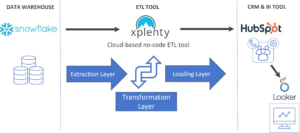
  • Choosing a cloud-based no-code ETL platform – Xplenty for integrations
  • Setting up secure connections between Snowflake and HubSpot
  • Designing the data flow: Extraction → Transformation → Loading
  • Creating a source-to-destination field map to match schemas, naming conventions, and formats
  • Identifying business-critical fields required across teams
This provided a strong and scalable foundation for the ETL system.
Designing the ETL Framework

Step 2: Building the Core ETL Pipeline

Once the architecture was in place, we built the first working version of the pipeline. The process included:
  • Writing SQL queries to extract relevant data (customers, payments, website events, marketing attributes)
  • Creating Xplenty Job Packages sourcing prepared tables to Hubspot destinations. In these packages cleaning, transformations and loading are possible
  • Cleaning and standardizing fields (IDs, dates, country codes, phone numbers).
  • Applying necessary transformations to match CRM rules
  • Loading the prepared data into HubSpot using structured batches.
At this stage, the pipeline successfully moved data end-to-end.

Step 3: Optimizing Performance (Incremental Loading + Query Improvements)

With the pipeline functional, we focused on improving speed and scalability. Key improvements:
  • Rewriting SQL logic to reduce unnecessary joins
  • Eliminating full table reloads
  • Implementing incremental loading using timestamps and change indicators in Xplenty
  • Reducing transformation load by pushing logic into Snowflake
  • Pruning unused columns to reduce data size
After these optimizations, runtime dropped from 45 minutes to under 4 minutes, a 90% improvement.
Optimizing Performance

Step 4: Automating Scheduling & Workflow Management

We then made the pipeline fully automated and predictable. This included:
  • Automating job schedules based on actual job run-time patterns. This reduced cloud resource requirements and saved cost. This optimized complete sync time as well.
  • Triggering syncs bi-weekly in a consistent manner. Change tracking enabled the jobs to be run at any time.
  • Adding retry logic and failure alerts to ensure monitoring and resolution.
  • Sequencing dependent tasks in the correct order
Automation reduced manual monitoring and ensured consistent daily performance.
Automating Scheduling

Step 5: Implementing Data Quality Checks & Monitoring

To maintain reliability, we created a monitoring layer:
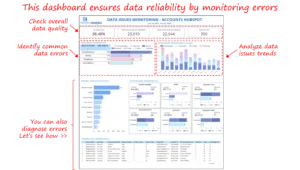
  • Built a data quality dashboard to track errors across fields
  • Added checks for completeness, formatting, and data consistency
  • Identified recurring issues like phone number formatting errors
  • Enabled teams to drill into sample data to diagnose problems quickly
This gave teams visibility and confidence in the system’s output.
Implementing Data Quality Checks & Monitoring

Step 6: Validating With Stakeholders

Throughout the process, we collaborated closely with:
  • Customer Success
  • Operations
  • Marketing
  • Data Engineering teams
These sessions ensured:
  • Field mappings were accurate
  • Business-critical fields synced correctly
  • Changes supported operational workflows
Validation helped drive adoption and trust across departments.
Talk with our BI experts today.Book a consultation session

Outcomes, Insights, and Business Impact

1. 90% Reduction in ETL Runtime

Combined runtime of some key ETL jobs was reduced from 45 minutes to less than 4 minutes, enabling faster and more frequent CRM syncs .

2. Improved Sync Cycles

By optimizing schedules and automating triggers, the total sync time dropped by 30%, enabling more up-to-date customer information.

3. Enhanced Data Reliability

The monitoring dashboard provided clarity into error patterns and improved trust in the data.

4. Reduced Operational Overhead

Automation and improved reliability eliminated time previously spent troubleshooting errors and delays. Runtime and Load optimization reduced operational costs as well.

5. Better Customer Insights & CX

With timely data in CRM and BI tools, Customer Success teams worked more efficiently, leading to faster case resolution and improved customer communication.

6. Foundation for Future Integrations

The new ETL architecture is modular, scalable, and ready for additional CRM objects or new data sources. Overall, the integration provided operational clarity, improved decision-making, and strengthened the company’s data foundations.

Challenges and Lessons Learned

Several lessons emerged during the engagement:
  • Field definitions differed across systems, underscoring the need for unified data governance.
  • CRM API constraints required careful batching and syncing.
  • Missing timestamps for some legacy tables required creative strategies for incremental loading.
  • Teams lacked visibility into sync failures. The gap was addressed through quality dashboards and alerts.
  • ETL projects require both technical and business alignment to succeed.
These challenges offered valuable insights that are applicable across industries undertaking data integration initiatives.

Strategic Recommendations for Future Data Engineering Work

To build on the improvements made, we recommend:
  1. Establish routine data governance reviews to maintain uniform definitions across teams.
  2. Adopt incremental loading as a standard, reducing compute costs and sync times.
  3. Leverage CDC(Change Data Capture) mechanisms for faster customer activity updates.
  4. Expand monitoring, including anomaly detection and schema drift alerts.
  5. Document data lineage to improve transparency and compliance.
  6. Continuously refine orchestration logic as volumes and business workflows evolve.
Organizations that view ETL not as a one-time task, but as an ongoing capability, tend to achieve durable operational excellence. Each month, we curate the latest updates, insights, and trends for senior leaders in data analytics and AI in our CXO Analytics Newsletter. Our mission is “to enable businesses to unlock value in data.” For over 20 years, we’ve partnered with more than 100 clients—from Fortune 500 companies to mid-sized firms—to solve complex data analytics challenges. Our services include Advanced Analytics Consulting, Generative AI Consulting, and Business Intelligence (Tableau Consulting, Power BI Consulting and Looker Consulting) turning data into strategic insight. We would love to talk to you. Do reach out to us for a free consultation.

Our Work

Industry

    Industry

Function

    Function
  • Industry

  • Function


*Subscribe to be the first one to know our latest updates

Contact us

Email us : cs@perceptive-analytics.com

Call us : 646.583.0001

or Fill out the form below:


Required*
Top 10 Emerging Analytics Startups in India to watch (Analytics India Magazine)

You have crafted a powerful analytical tool for us. Thank you.

Alan Benjamin
Principal, Benjamin Realty Advisors

I have been working with Chaitanya and Perceptive Analytics for about 20 months now. They did BI / reporting and excel tool development. Their work helped us in channeling our periodic reports to the senior and operational management. The team exceeded my expectations. Chaitanya would ask thought provoking questions that trigger a new line of thinking. They created good dashboards so our senior team can quickly interpret reports. We were able to make progress because the team knew finance and tools they created were easy to implement.

Samir Lavani
CFO at Pearl Hospitality

Chaitanya and the Perceptive Analytics team worked on multiple strategic projects that involved Tableau data visualizations. Perceptive's work (~ 1 year) led to successful launch of our portal - this was an important milestone for us. Visualizations created were insightful, easy to understand and visually attractive. The team often suggested ways to show data in more intuitive way so our audience can understand it. They also knew Tableau well that helped in customizing it for our purposes. The team worked hard to finish the project on time managing expectations. I look forward to working with Perceptive on other projects.

Haroon Yaqoob
Principal at Nomenclature Inc.